
The idea in one minute
A Square payment link is a fixed amount — it can only collect the full price, so it can't take "money down." The tool that does deposits is Square Invoices.
Set the full price (say $600), ask for a deposit now (say $97), and Square remembers the balance and who still owes it.
Full offer = $600
Deposit due now = $97
Balance (scheduled) = $503
Do it — step by step
On your phone
Square app- Open the Square app → ≡ More → Invoices.
- + Create Invoice. Add the customer (name + email or cell).
- Add the item and set the full price (e.g.
$600). - Tap Payment schedule → turn on Request deposit.
- Enter the deposit as a fixed amount →
$97, due now. - The remaining $503 is the balance — set a due date.
- Send. They pay $97 today; the balance is tracked automatically.
On your computer
Square Dashboard- Go to your Square Dashboard → Invoices.
- Create Invoice → add the customer.
- Add the item, set the full price (e.g.
$600). - Payment schedule → toggle on Request Deposit.
- Enter
$97due now; the $503 balance gets its own due date. - Save → Send.
"Add a payment schedule" greyed out?
If the deposit option is disabled and you see "Payment schedules can't be used with Bitcoin," Square auto-enabled Bitcoin as an accepted method (a 2026 rollout) — and it blocks payment schedules while it's on. Turn Bitcoin off in your invoice settings (a separate switch from in-person checkout) and it comes right back:
- Square Dashboard → Invoices & payments → Invoices → Settings → Invoices.
- Open your default template ("Square invoice") → Edit.
- In the right panel open Accepted payment methods → uncheck Bitcoin.
- Click Save template.
Make it reusable
Doing this a lot? Save the invoice as a template — every "money down" customer takes 30 seconds.
- Deposit + balance (free): the invoice deposit above = two payments (money down, then the rest).
- Even installments (free): to split into equal chunks (e.g. 4 × $124.25), use a Square Subscription — a recurring plan for the even amount, set to a fixed number of cycles, shared as a payment link. Subscriptions cost nothing extra; the customer enters a card once and is auto-charged each cycle.
- Uneven milestones on one invoice: "Split balance into milestones" (the ★ feature) needs Square Invoices Plus — $20/mo (30-day free trial), which also lowers your invoice card fee to 2.9%+30¢.
Free even installments — the exact setup
Square Subscriptions do equal-chunk plans at no extra cost. Create a plan, add a Monthly frequency, set Subscription ends → After # of billing cycles (e.g. 4), and attach an item priced at the per-payment amount (e.g. $124.25 for a $497 offer split 4 ways). Share the plan's payment link; the card is charged that amount each month until it ends.
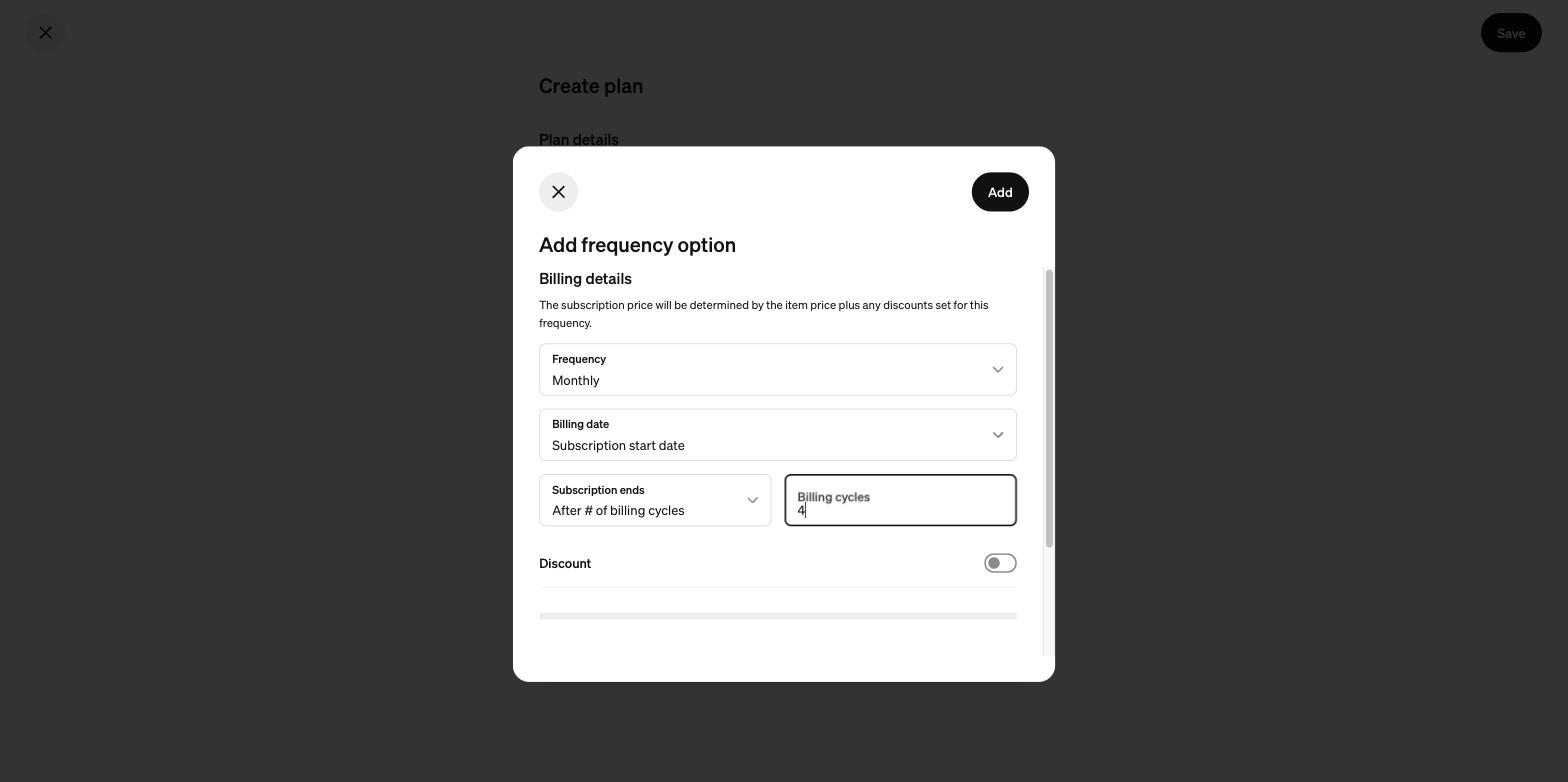
The one setting that makes it an installment plan: Subscription ends → After # of billing cycles — it caps an open-ended subscription at a fixed number of even payments, free.